
Choose what gets captured
Capture starts from an explicit allowlist. Transcription and speaker fingerprints stay local, with source controls and status information in the interface.
Local transcription, persistent speaker identity, and searchable conversation history for VR and voice chat. Capture only the applications you explicitly allow.
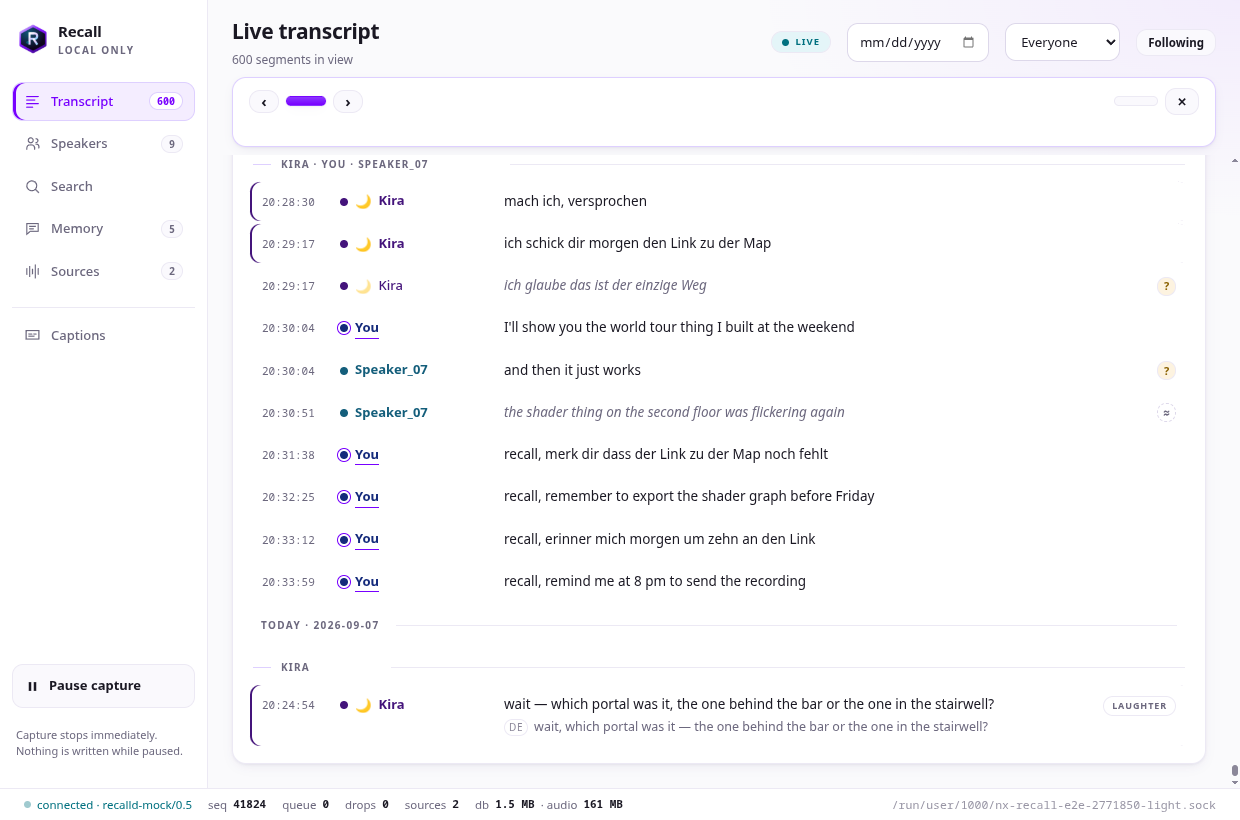
Capture starts from an explicit allowlist. Transcription and speaker fingerprints stay local, with source controls and status information in the interface.
Find conversations by speaker, date, or words. Optional local models add semantic search and a memory graph for exploring relationships and commitments.
Desktop captions, uncertain-row review, and later reprocessing help make speech useful after the moment has passed. Optional night-shift processing revisits the day locally.
Requirements and setup vary by project. The repository documentation is the source for complete instructions.
Read the documentation ↗Install the Linux release through NX Hub or download it directly. Follow the README to fetch speech models and enable the user service.
Use the app’s source controls or recalld probe to find applications, then explicitly allow the ones you want to capture.
Open the transcript, identify speakers, and search your history. Add semantic or graph models only when you want those optional features.
Linux x86-64 with PipeWire and a systemd user session. Desktop captions require Wayland. Model downloads need initial network access and local storage.
The OpenXR headset overlay is experimental. Desktop transcription and captions should not be confused with a validated in-headset overlay.
Documentation, development, and help.